Schedule (depending on your account)
Define when and how customers can book appointments with you. The first time you'll see Create my calendar, which starts with Monday to Friday from 09:00 to 18:00.
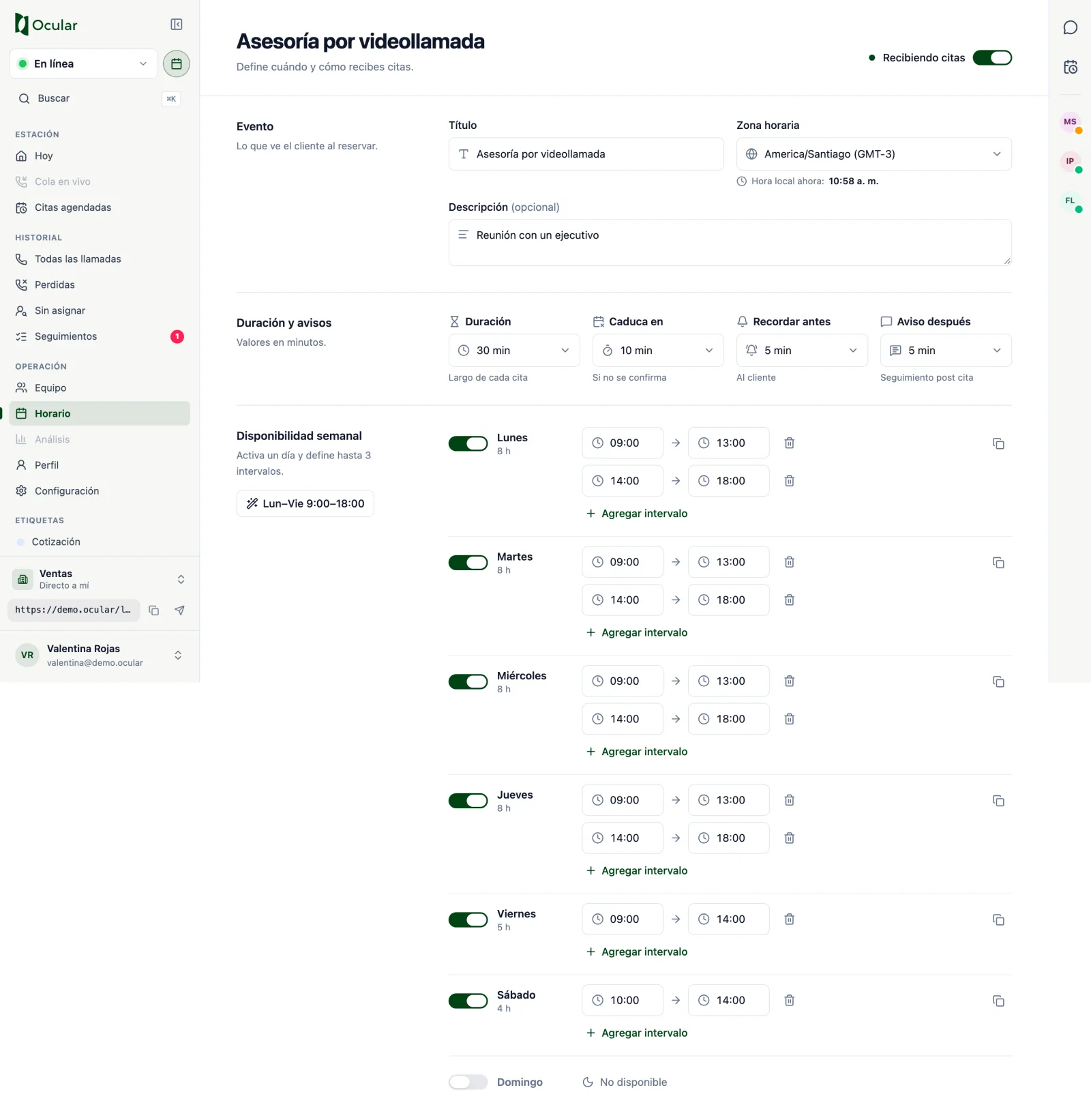
- Accept appointments: the toggle at the top pauses or reactivates your booking calendar.
- Event: the title and description the customer sees when booking, and your time zone.
- Duration and reminders (in minutes):
| Field | What it's for | Options |
|---|---|---|
| Duration | Length of each appointment | 15, 20, 30, 45, 60, 90 or other |
| Expires in | How long the appointment waits if nobody joins | 5, 10, 15, 30, 60 or Never |
| Remind before | Reminder to the customer before the appointment | 10, 15, 30, 60, 120, 1440 or Disabled |
| Notice after | Follow-up message after the appointment | 5, 10, 15, 30 or Disabled |
- Weekly availability: turn on each day and define up to 3 time ranges. Use
Copy scheduleto repeat it from Monday to Friday or across the whole week.
When you change something, You have unsaved changes appears: press Save changes or Discard.